
Git LFS: How to Manage Large Files in Git Repositories
Learn how Git LFS works, how to set it up, migrate large files, manage storage, and use Git LFS for production Git repositories.

Git is excellent at tracking source code. It is much less efficient when the repository starts filling with 500 MB design assets, datasets, videos, compiled binaries, or machine learning models.
The problem gets worse over time. Replace a 500 MB binary file ten times and Git can retain versions of that data in repository history. Developers may only need the latest version, but every fresh clone can inherit the weight of years of changes.
That is exactly the problem Git LFS (Git Large File Storage) is designed to solve. Instead of storing every large binary object directly in normal Git history, Git LFS keeps a small pointer in the repository and stores the actual file separately. Developers continue using familiar Git workflows while repositories remain significantly easier to manage.
This guide explains how Git LFS works, when to use it, the essential Git LFS commands, and what engineering teams should consider when deploying Git LFS at enterprise scale.
Why Large Files Become a Problem in Git
Git's architecture works exceptionally well for source code because text files are generally small and Git can efficiently track changes between versions. Large binary files behave differently. Consider a game development team storing textures, 3D assets, audio, and packaged binaries. Or an ML team versioning model weights and datasets. Git can technically store those files, but repeated changes increase the amount of data retained in repository history.
Deleting the current copy does not necessarily solve the problem. If a large object exists in earlier commits, it remains part of the repository's history unless that history is rewritten. The result can be slower clones, greater network transfer, increased disk consumption, larger backups, and more expensive repository operations.
This is why the question is not simply whether Git has large file support. It does. The better question is whether storing those files as normal Git objects is operationally sensible.
For a deeper explanation of Git's architecture and repository model, see our guide to Git version control for enterprise environments.
What Is Git LFS?
Git Large File Storage is an extension to Git designed to handle large files without placing their full contents directly into normal repository history. The developer still sees the real file in the working directory. Inside the Git repository, however, Git LFS stores a small text pointer containing information that identifies the corresponding LFS object. The actual binary content lives in separate Git LFS storage.
Conceptually, the architecture looks like this:
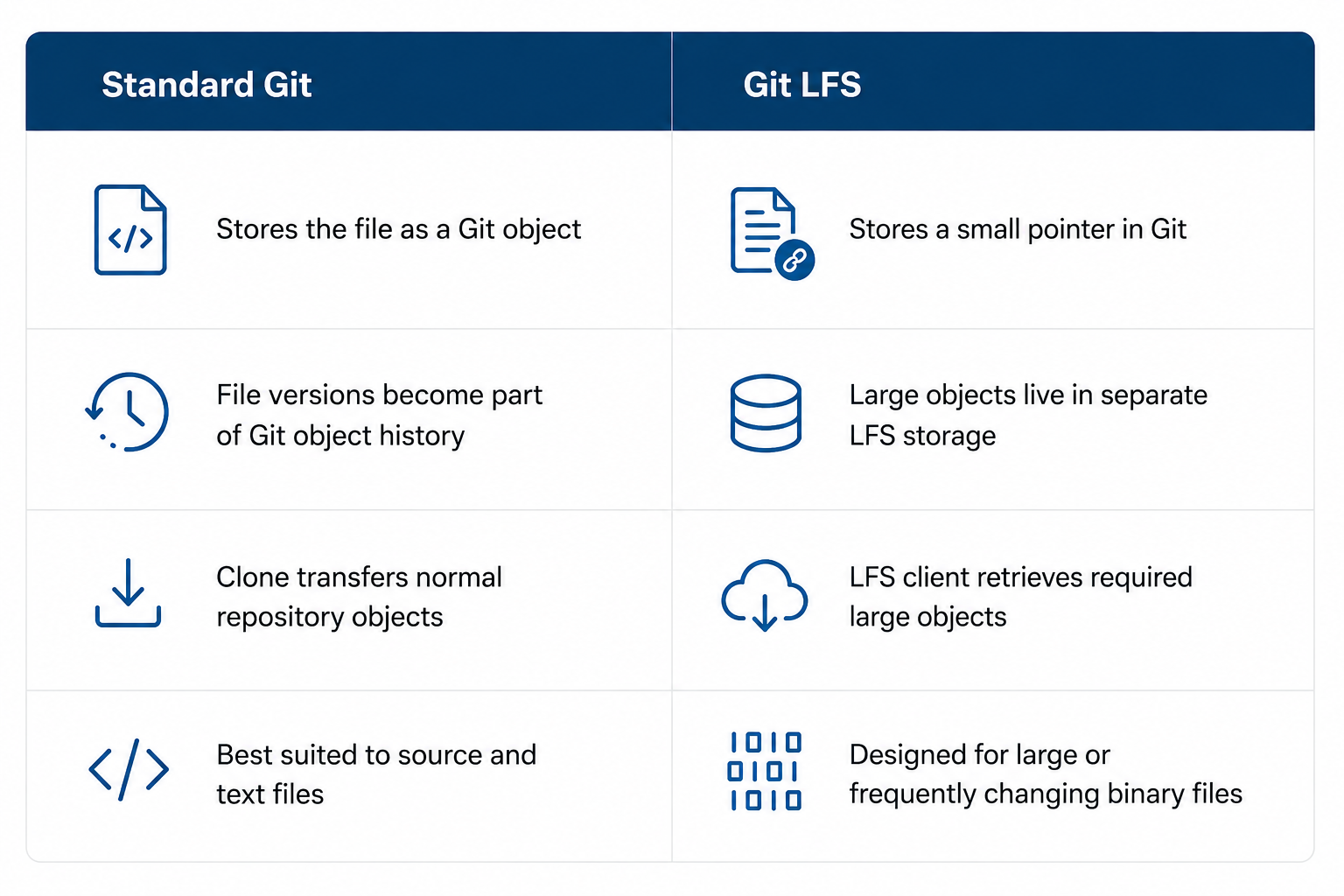
This separation is the key idea behind using Git LFS.Git still tracks which version of an asset belongs to each commit. Git LFS changes where the heavy content is stored and how it is transferred.
How Does Git LFS Work?
When Git LFS is configured for a file type, the Git LFS client uses Git's filter mechanism to intercept those files. Suppose a repository tracks .psd files with LFS. A developer adds homepage.psd and commits it. Instead of inserting the full Photoshop document into regular Git storage, LFS creates a pointer that references the corresponding object. The actual .psd content is uploaded to the LFS server when the developer pushes.
Another developer cloning or checking out that revision receives the pointer through Git. The LFS client then retrieves the corresponding asset and places the real file in the working tree. From the developer's perspective, the repository still behaves much like a normal Git repository.
Underneath, the storage is split between two components. The Git repository stores the pointer and project history, while LFS storage holds the actual large file. This distinction is particularly useful for binary files because Git cannot achieve the same storage efficiencies with many binary formats as it can with source code.
When Should You Use Git LFS?
Git LFS is useful when large files belong logically with the source project and need versioning, but storing every version directly in Git would make the repository unnecessarily heavy.
Typical candidates include:
- images, video, audio, design files, 3D assets, large datasets, model files, archives, and other binary assets;
- files that change regularly and whose previous versions would otherwise accumulate inside Git history;
- assets required by builds or development workflows that need to remain associated with specific commits;
- repositories where clone size and transfer time are becoming an operational problem.
File size alone is not the only criterion. A relatively large file that almost never changes may create less trouble than a smaller binary that is replaced hundreds of times. Teams should consider size × update frequency × retention period × number of developers. Git LFS is also not a universal artifact management system. Build outputs, temporary packages, container images, and disposable generated files may belong in an artifact repository, package registry, or object store rather than source control. The goal is not to put every large file into LFS. It is to keep assets that genuinely belong to the versioned project without making standard Git storage carry unnecessary binary history.
Git LFS Setup: A Practical Workflow
A basic Git LFS setup has two sides: the client needs Git LFS installed, and the remote repository service must support the LFS protocol.
Once the client is available, initialize it:
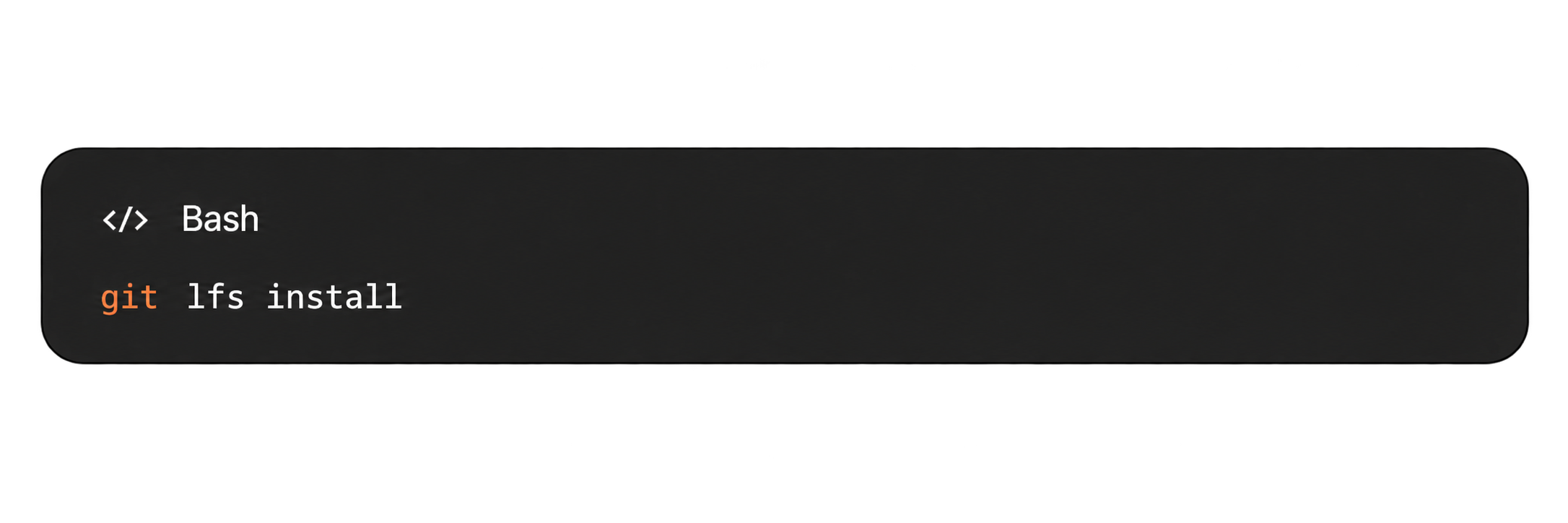
Then specify which files should use LFS. For example:
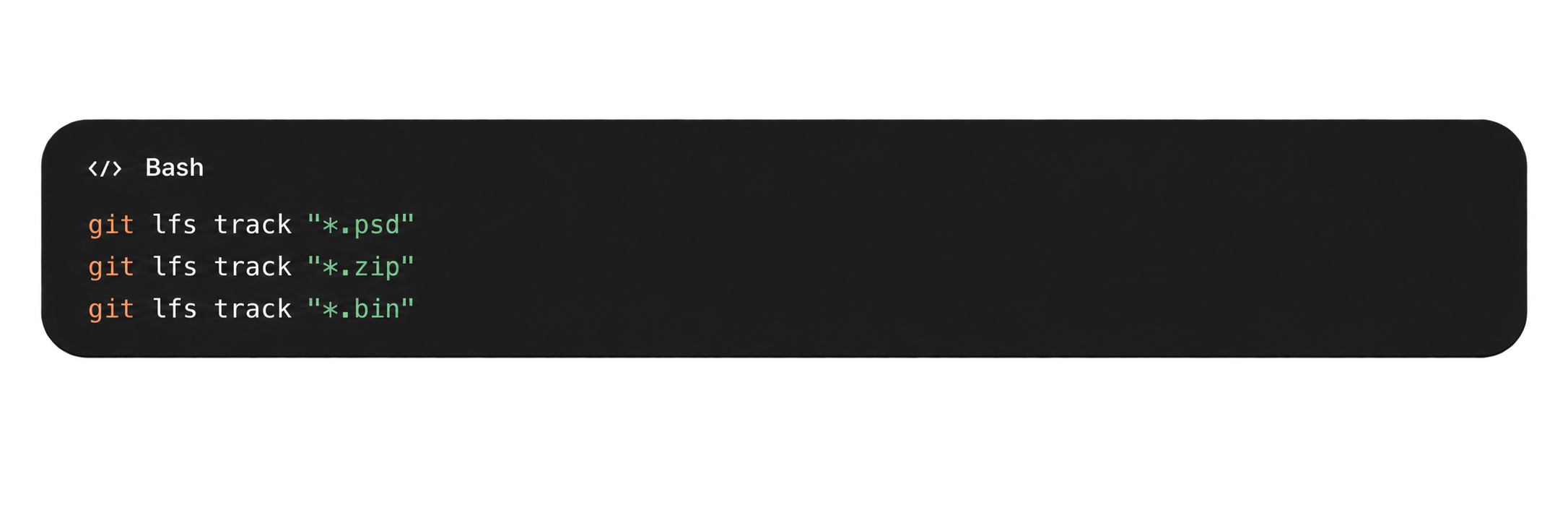
Git LFS records these rules in .gitattributes. That file should be committed so other developers receive the same tracking configuration:
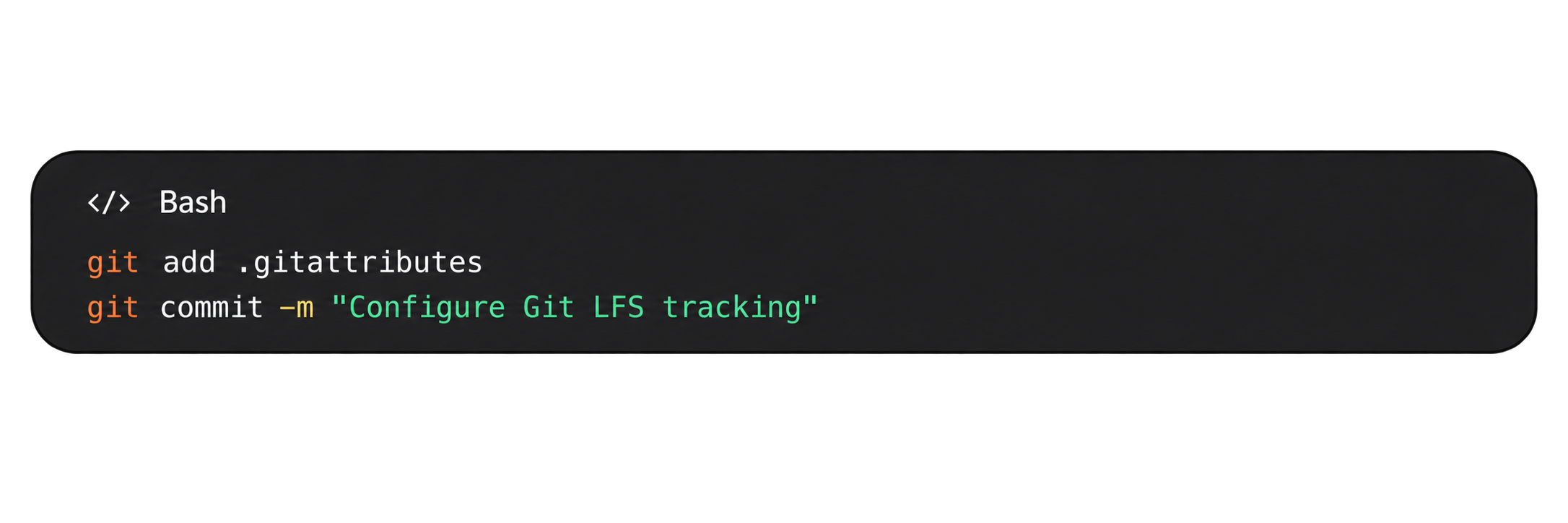
Files can then be added and committed normally:
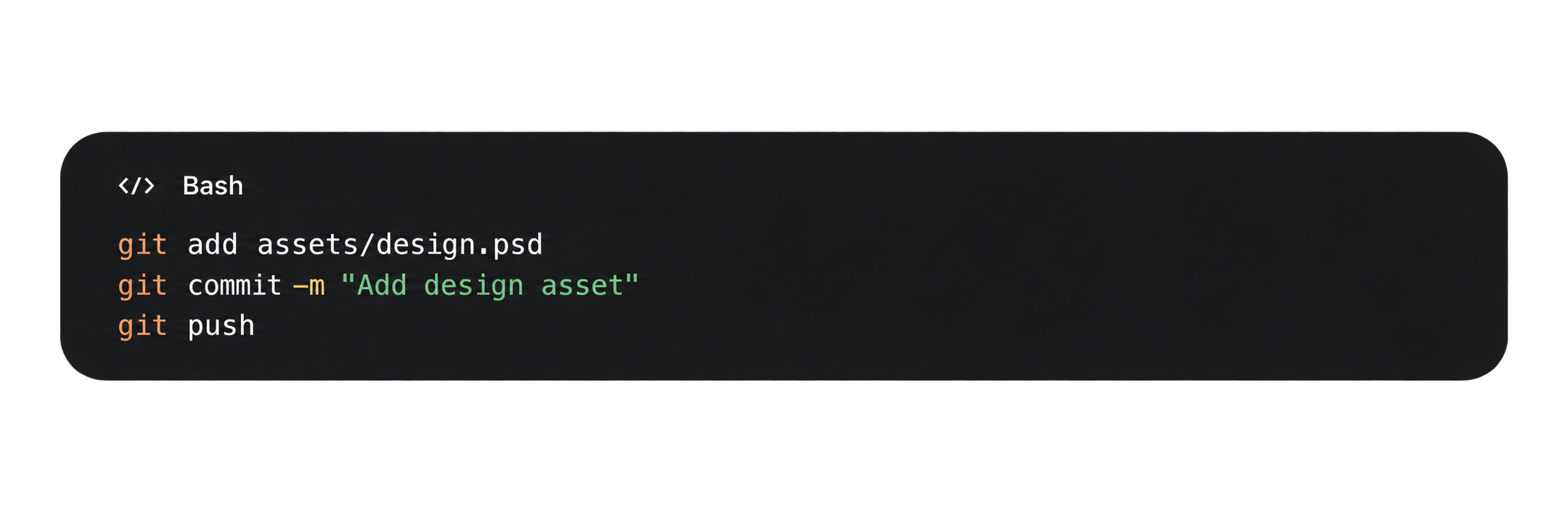
One important detail is easy to miss: git lfs track affects files according to the configured tracking rules going forward. It does not magically remove large objects that already exist throughout old Git history. If a repository is already bloated, migration needs to be treated as a separate task.
Git LFS Commands Worth Knowing
You do not need a large command vocabulary for day-to-day LFS work. A small set covers most workflows.
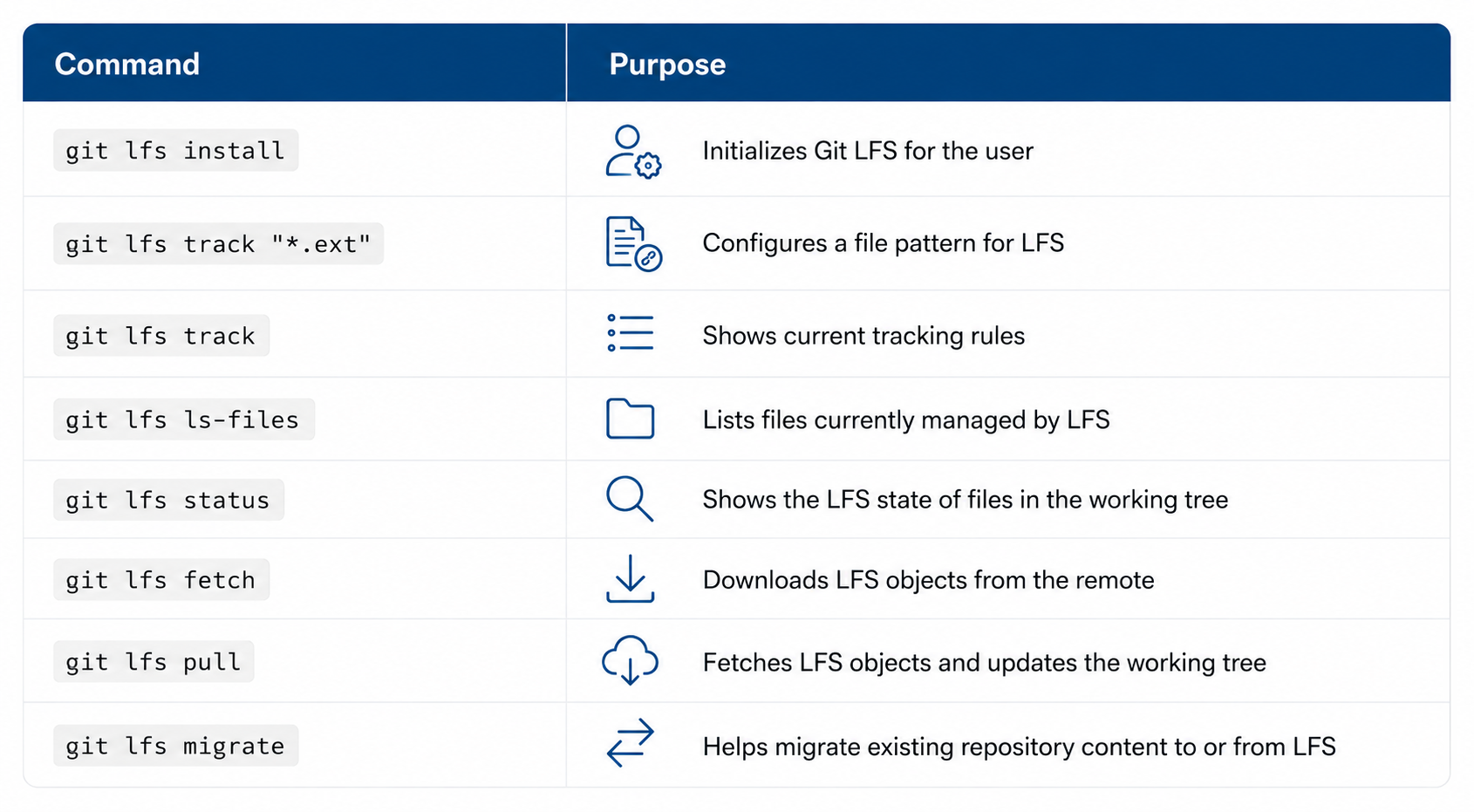
These Git LFS commands are deliberately close to the normal Git workflow. Developers continue to branch, commit, merge, pull, and push as usual. If your team needs a broader CLI reference, RhodeCode's guide to Git commands for enterprise development covers the underlying Git operations around that workflow.
Moving Existing Git Large Files to LFS
Starting LFS in a new repository is straightforward. Retrofitting it into a repository with years of large binary history requires more care.
Simply tracking *.zip today does not convert the ZIP files contained in previous commits. Historical objects remain part of ordinary Git history.
git lfs migrate can rewrite selected history so matching files become LFS-managed objects. But history rewriting changes commit IDs, which affects branches, tags, forks, open work, and other clones. For a production repository, migration should therefore be planned rather than treated as a cleanup command.
Inventory the largest objects first. Decide which patterns genuinely belong in LFS, back up the repository, test the migration on a copy, and coordinate the history rewrite with everyone using the repository. CI systems, mirrors, and automated integrations should also be tested against the migrated repository before normal development resumes.
For some organizations, avoiding a risky all-at-once migration is more important than immediately optimizing every historical object. The same principle applies more broadly to enterprise source code management: repository architecture should fit operational constraints rather than forcing disruptive changes solely for tooling convenience.
Git LFS Storage Is Still Infrastructure
Moving large objects out of normal Git history does not make the data disappear. It changes where you manage it. For a small project, that distinction may be mostly invisible. For an enterprise storing terabytes of assets, Git LFS storage becomes an infrastructure concern of its own.
Capacity planning needs to account for the accumulated LFS objects, not merely current working-tree size. Backup and recovery procedures must protect both the Git repository and the associated LFS data. If one is restored without the other, repository history may point to objects that are unavailable.
Network architecture matters too. A developer may clone Git metadata quickly and then spend far longer retrieving the LFS objects required by the working tree. Distributed teams therefore need to think about bandwidth, storage location, latency, CI workloads, and how frequently large assets are fetched.
Security policies should apply to LFS content as seriously as they apply to source code. Moving a proprietary model, CAD file, or dataset outside normal Git objects does not make it less sensitive. For enterprise teams, Git LFS should therefore be evaluated as part of repository infrastructure, not just as a developer-side extension.
Git LFS with RhodeCode
RhodeCode supports Git LFS directly in its self-hosted source code management environment. Git LFS API v2 support was introduced in RhodeCode 4.7, allowing RhodeCode to act as the Git LFS server and enabling users to download LFS objects through the web interface.
The implementation has continued to evolve. RhodeCode 5.0 added the ability to push and pull LFS objects when remote synchronization is enabled, and version 5.1 added Git LFS synchronization automation for remote push/pull workflows.
More recently, RhodeCode 5.2/5.3 introduced an S3-based artifact storage engine for scalable large-file handling and moved configuration paths for Git LFS and Mercurial Largefiles into the .ini configuration. This is relevant for organizations that need Git for large files but also want the repositories and associated assets managed within infrastructure they control.
It also fits RhodeCode's broader multi-VCS model. Git LFS can address large assets in Git environments, while RhodeCode also supports Mercurial and SVN under the same source code management platform. For enterprises operating mixed repository infrastructure, that avoids turning large-file management into another isolated system.
Git LFS vs Other Ways to Manage Large Files
Git LFS solves a specific problem. It should not automatically be the answer to every large object associated with a software project. Use regular Git for source code and files that Git handles efficiently. Use Git LFS when large versioned assets need to follow the repository's history and development workflow. Use an artifact or package system when the files are outputs or dependencies with their own release lifecycle. For extremely large monorepositories, LFS may also be only one part of the performance strategy. Repository organization, sparse checkout, caching, mirrors, CI design, and infrastructure location can matter just as much. This is why Git large file support should be evaluated in context. LFS reduces one important source of repository growth, but it does not replace sound repository architecture.
Git LFS Best Practices for Production Repositories
For production use, the most effective Git LFS strategy is usually the simplest one:
- Define LFS rules early. Decide which file types belong in LFS before large binary histories accumulate.
- Commit .gitattributes. Tracking policy should live with the repository rather than depend on individual developer configuration.
- Keep generated artifacts elsewhere. LFS should not become a dumping ground for every large output produced by CI.
- Monitor storage and backups. Treat LFS objects as production data and verify that recovery procedures restore both repository metadata and large-file content.
- Test migrations before rewriting history. Existing large repositories may have branches, tags, CI jobs, mirrors, and developer clones that depend on current commit IDs.
These practices keep the technology predictable. The hardest Git LFS problems usually come not from the LFS protocol itself, but from introducing it after repository size and operational dependencies have already become difficult to control.
Is Git LFS the Right Choice for Your Repository?
If large binary files are making clones slower, consuming excessive storage, or causing repository history to grow far beyond the actual source code, Git LFS is often the right tool. Its model is straightforward: keep lightweight references in Git and store the heavy objects separately. Developers retain a familiar Git workflow while infrastructure teams gain a cleaner separation between source history and large-file storage. But enterprise deployments need to look beyond git lfs install.
Storage capacity, backups, access control, network performance, migrations, CI/CD, and disaster recovery all become part of the design once large-file storage moves into production. RhodeCode brings Git LFS into the same self-hosted environment used to manage repositories, permissions, code review, integrations, and enterprise source control. RhodeCode also supports Git, Mercurial, and SVN, which can matter when large-file requirements exist alongside mixed or legacy VCS infrastructure.
If you need to manage Git repositories and large assets while keeping source code infrastructure under organizational control, explore RhodeCode Enterprise to see how it fits your repository architecture.