

Git Commit Signing: How to Sign and Verify Git Commits
Learn how to sign and verify Git commits with GPG, SSH, and Sigstore, strengthen source code security, and enforce enterprise signing policies.
Anyone with write access to a Git repository can create a commit using another developer’s name and email address. Without additional verification, misleading changes can appear legitimate in repository history, compromising accountability and source code security.
Git commit signing addresses this weakness by attaching cryptographic signatures to commits. Organizations can verify whether a trusted credential signed a commit and whether its signed content remains intact.
For enterprises managing sensitive intellectual property, regulated applications, and AI-assisted development workflows, signed commits provide an additional layer of protection. Their effectiveness, however, depends on consistent verification and repository governance.
What Is Git Commit Signing?
Git commit signing uses digital signatures to associate a Git commit with a cryptographic signing identity. Verification checks whether the signature is valid and whether the corresponding signing credential is trusted.
Standard Git commits contain author names, email addresses, timestamps, and information about changes. However, author metadata is configurable and does not independently authenticate the contributor.
Signed commits provide cryptographic evidence of commit integrity and control over a signing credential. Connecting that credential to an authorized developer or service requires an appropriate identity and trust management process.
Why Should You Sign Git Commits?
Commit signing is particularly valuable for organizations developing business-critical applications, infrastructure configurations, and software subject to regulatory requirements. Misleading or unauthorized changes can introduce vulnerabilities, disrupt operations, and complicate security investigations.
Key benefits of Git commit signing include:
- Identity verification: associate commits with trusted signing credentials rather than editable author metadata.
- Source code integrity: detect modifications that invalidate existing signatures.
- Accountability: provide additional evidence for security investigations and compliance audits.
- Policy enforcement: support controls that prevent unsigned or untrusted changes from reaching critical branches.
- Software supply chain security: strengthen confidence in changes entering development and release workflows.
Valid signatures do not guarantee that code is safe or free from vulnerabilities. Organizations should combine signing with established Git repository security best practices, including access restrictions, code reviews, and automated security testing.
Git Commit Signing Methods: GPG, SSH, and Sigstore
GPG, SSH, and Sigstore offer different approaches to signing credentials, identity verification, and trust management. Choosing the right method depends on existing infrastructure, developer workflows, and organizational security requirements.
GPG Commit Signing
GPG uses the OpenPGP standard to generate cryptographic signatures. Developers sign commits with private keys, while verification systems validate signatures using corresponding public keys.
GPG works well in organizations with established key management procedures. However, distributing public keys, managing expiration dates, and handling revocation can become operationally complex across large engineering teams.
Git SSH Commit Signing
SSH signing allows developers to sign commits using SSH keys with Git 2.34 or later. Unlike SSH authentication, which controls access to remote repositories, SSH signing creates a persistent signature associated with a commit.
Teams familiar with SSH infrastructure can adopt this method with relatively little additional configuration. Dedicated signing keys and trusted signer mappings help maintain credential isolation and reliable identity verification.
Sigstore Git Commit Signing
Sigstore introduces identity-based signing through tools such as Gitsign. Its typical keyless workflow uses short-lived certificates associated with an authenticated identity instead of relying exclusively on persistent developer-managed keys.
This approach can simplify aspects of credential management and provide transparency-log evidence. Enterprises should evaluate identity-provider dependencies, connectivity requirements, and verification infrastructure before adopting Sigstore.
GPG vs SSH vs Sigstore: Key Differences
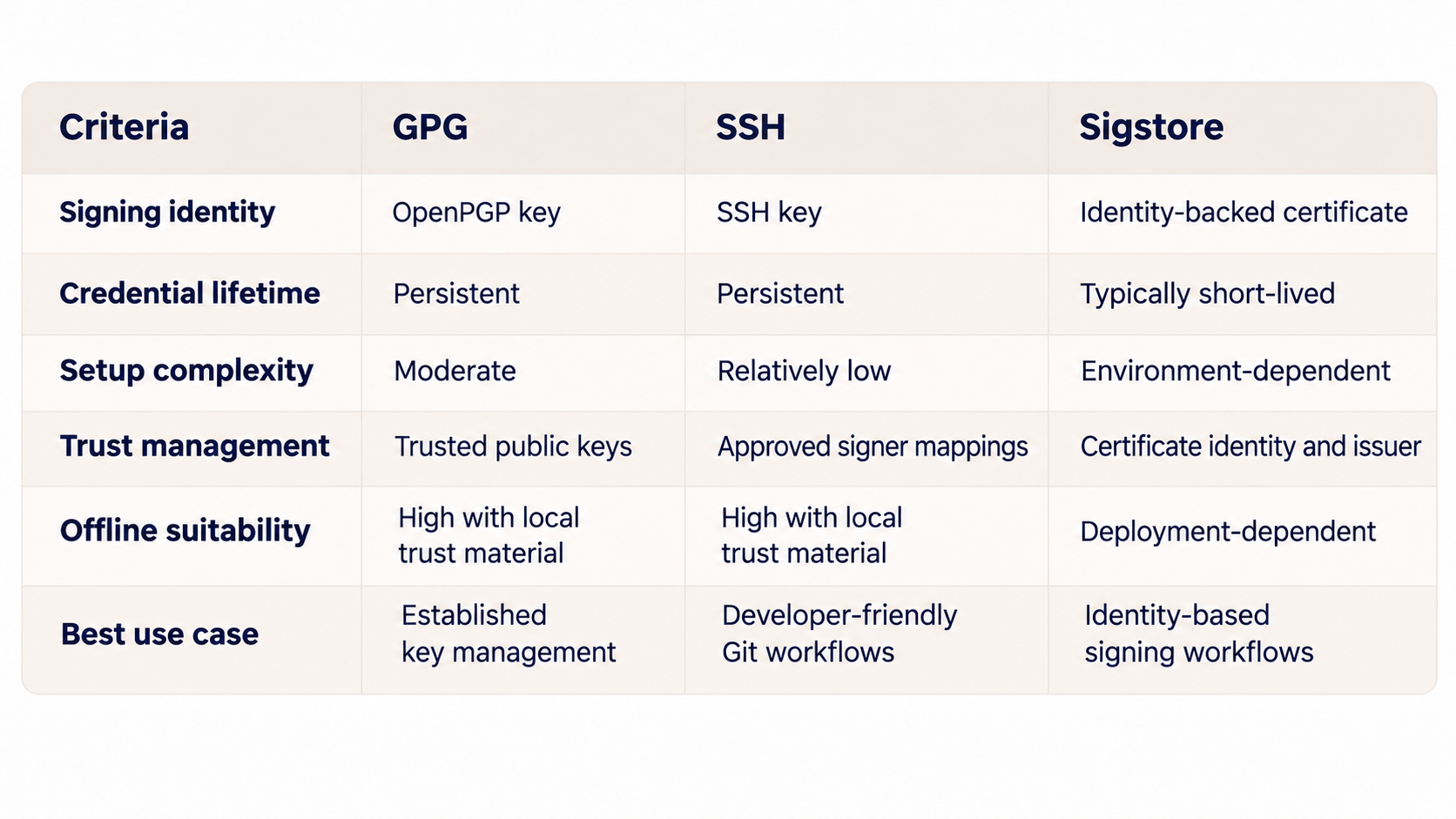
GPG remains suitable for organizations with mature cryptographic key management, while SSH offers a practical starting point for many engineering teams. Sigstore provides an alternative for organizations adopting identity-based software supply chain security.
How to Sign Git Commits
Git supports signing individual commits and automatically signing every new commit. Developers must first configure an appropriate signing mechanism and credential.
How to Sign a Git Commit with GPG
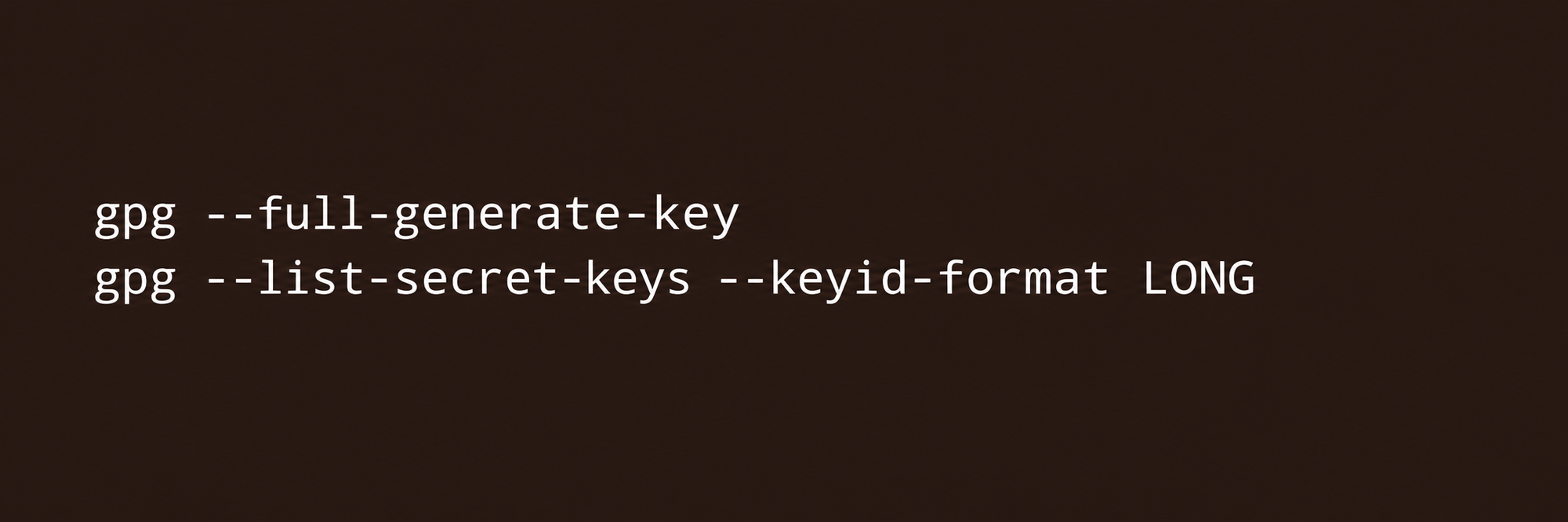
Install GnuPG and generate a signing key if one is not already available. Use the following commands to create a key and retrieve its identifier.
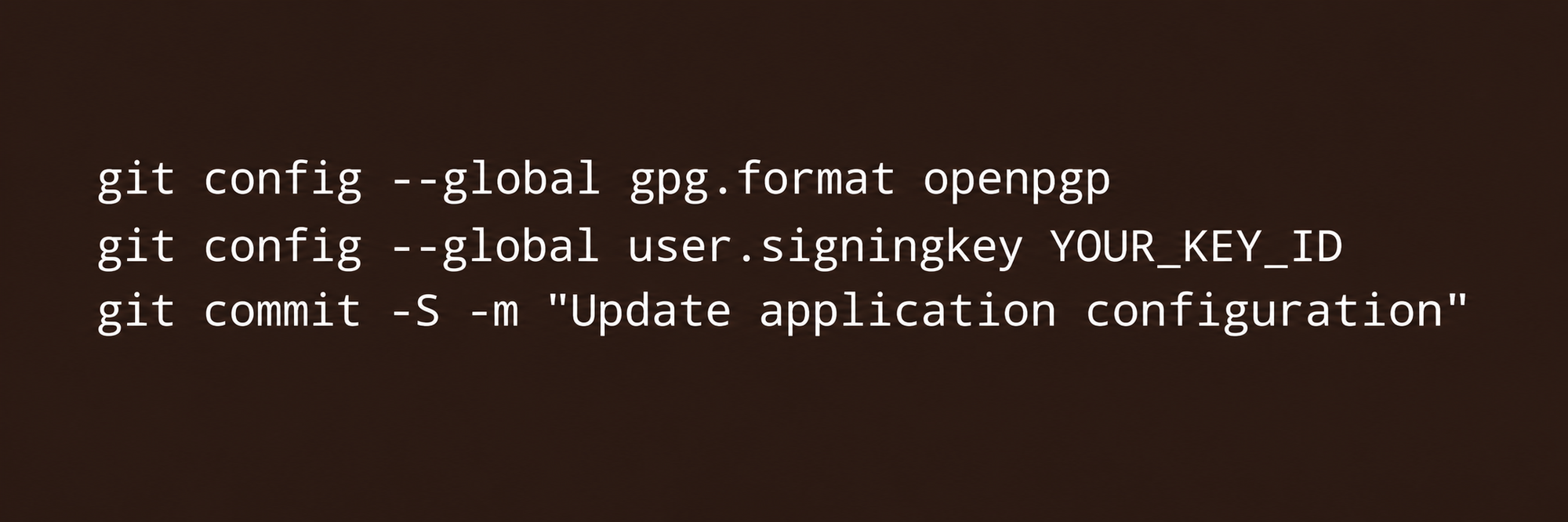
Configure Git to use the selected key and create a signed commit. Replace YOUR_KEY_ID with the actual signing key identifier.
Distribute the corresponding public key through an approved trust management process. Private signing keys must remain protected and should never be stored in source code repositories.
How to Sign Git Commits with SSH
Generate a dedicated SSH signing key or use an existing compatible credential approved by your organization. Configure Git to use SSH as its signing format.
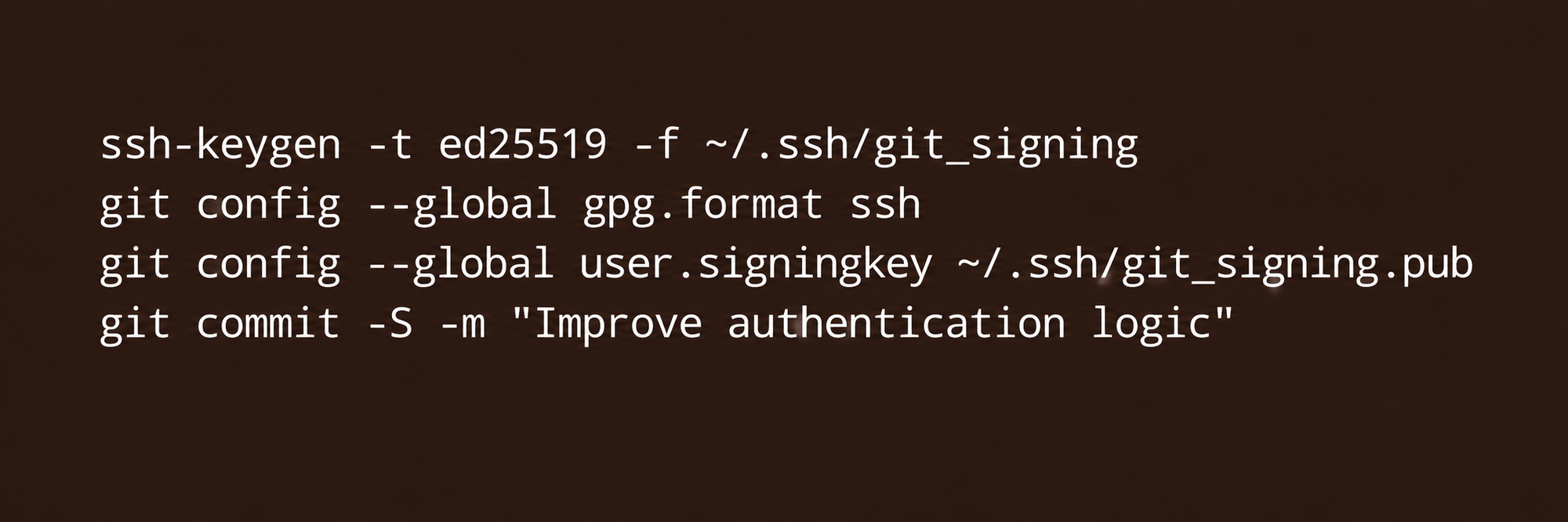
Git uses the corresponding private key to generate the signature. Depending on the environment, developers may need to load that key into their SSH agent.
How to Sign Git Commits with Sigstore
Install Gitsign and configure it within the repository where Sigstore-based signing is required. Git delegates the signing operation to Gitsign through its X.509 signing configuration.
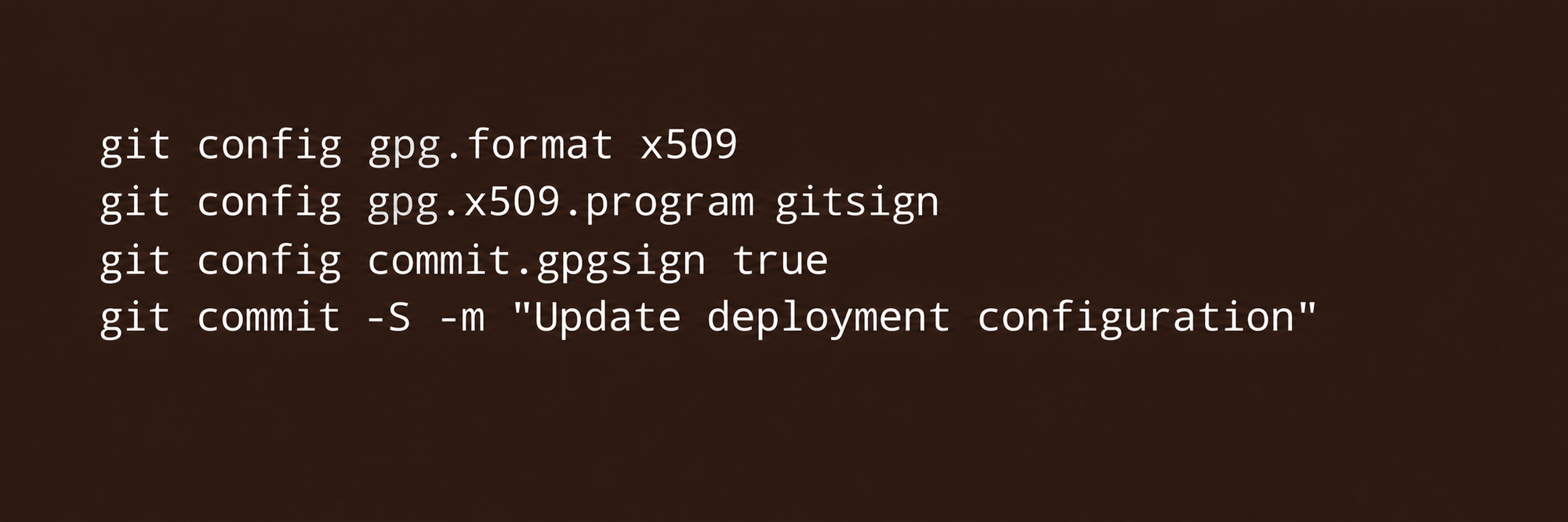
During a typical keyless workflow, Gitsign authenticates the signer and obtains a short-lived signing certificate. Production environments and automated workflows may require additional configuration, as described in the official Sigstore documentation.
How to Automatically Sign Git Commits
Enable automatic signing after configuring your preferred signing mechanism. Git will then sign new commits by default.

Remove --global to apply this setting only to the current repository. Automatic signing improves consistency but cannot replace centralized enforcement because developers can override local configuration.
How to Verify Signed Git Commits
Signature verification determines whether a signature matches the commit payload and whether the signing credential satisfies applicable trust requirements. Git provides built-in commands for inspecting individual commits and repository history.
Verify the latest commit:

Display signature information across repository history:

Inspect signature status for recent commits:

Common signature status indicators include G for a good signature, B for a bad signature, U for a good signature with unknown validity, and N for an unsigned commit.
SSH verification additionally requires a trusted signer configuration. Git supports an allowed signers file that associates approved identities with their public signing keys.
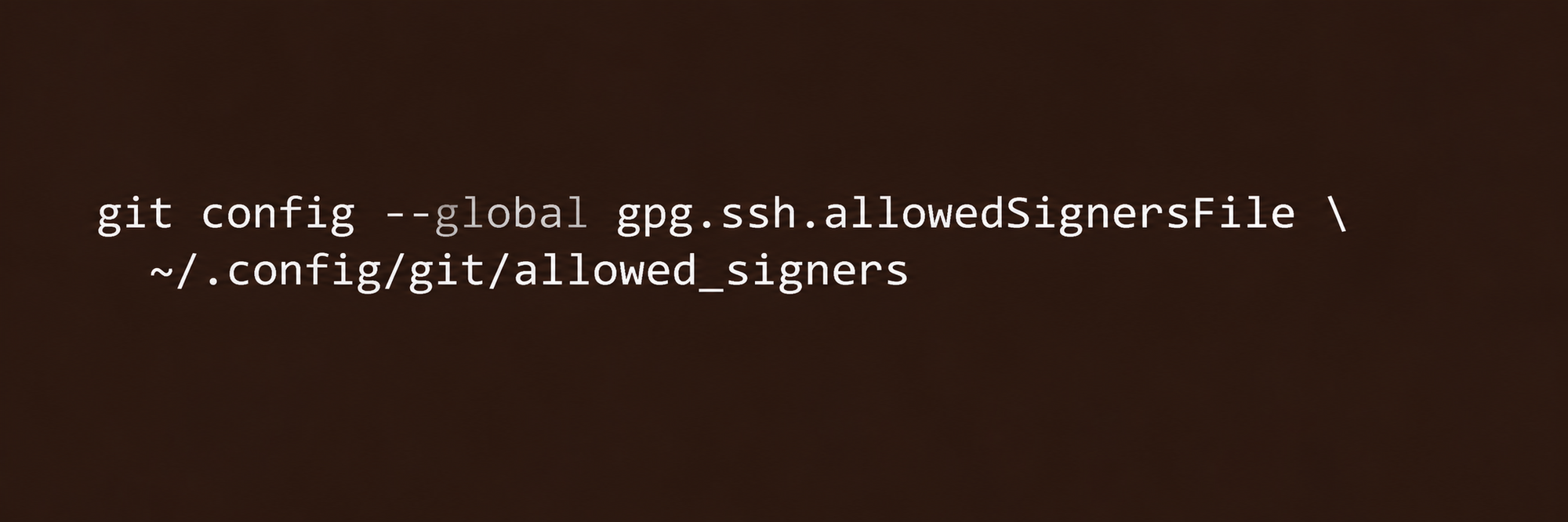
Populate this file with independently validated public keys. Sigstore verification similarly requires evaluating expected certificate identities and issuers.
Successful cryptographic verification does not automatically establish organizational authorization. Security policies must also determine whether the signing identity is permitted to contribute to the relevant repository.
Git Server-Side Commit Verification
Local signing configuration encourages consistent developer practices, but enterprise source code management requires controls beyond individual workstations. Contributors can otherwise disable signing or use credentials that do not meet organizational requirements.
Server-side commit verification evaluates incoming changes before they reach protected branches. Depending on the SCM platform, organizations can implement these controls through repository policies, server-side hooks, or mandatory CI checks combined with merge restrictions.
Verification should examine all relevant incoming commits rather than only the latest commit in a branch. Squash merges and rebases also require attention because rewriting Git history creates new commit objects that may need fresh signatures.
RhodeCode lists signed commits on protected branches among its documented change management controls. Its security and compliance capabilities connect repository access, authentication, approvals, and auditability within a centrally managed environment.
Git Commit Signing Best Practices for Enterprise Teams
Enterprise signing policies must accommodate developers, external contributors, automated services, and release pipelines. Consistent governance becomes increasingly important as organizations expand across repositories and distributed engineering teams.
Consider the following best practices:
- Define trusted signing identities. Maintain approved keys, certificates, and identity mappings.
- Protect private credentials. Use secure key storage and hardware-backed protection where appropriate.
- Enforce verification on critical branches. Prioritize production, release, and security-sensitive repositories.
- Separate human and machine identities. Assign dedicated credentials and restricted permissions to CI/CD pipelines.
- Establish rotation and revocation procedures. Define how compromised or expired credentials affect verification.
- Combine signing with code reviews and security testing. Valid signatures should never replace independent validation.
Gradual implementation helps identify incompatible tooling, unsigned automation, and merge strategies that conflict with verification policies. Organizations can then expand signing requirements without unnecessarily disrupting development workflows.
Git Commit Signing vs Code Provenance
Commit signing establishes that a particular credential signed a commit payload. Code provenance addresses a broader question: where the code originated and how it entered the development lifecycle.
Consider an AI-generated authentication module committed by an authorized developer. Its valid signature provides evidence that the developer's credential signed the commit, but it cannot independently establish whether the code was AI-generated, copied from external sources or adequately reviewed.
Combining signature verification with provenance information, repository governance, and review records provides a stronger foundation for software supply chain security. This distinction becomes increasingly important as AI-assisted development introduces new challenges for code ownership and accountability.
Secure Source Code Management with RhodeCode
Git provides the mechanisms required to sign and verify commits, but managing security consistently across enterprise repositories requires centralized governance.
RhodeCode helps organizations manage Git, Mercurial, and SVN repositories within a unified, self-hosted environment. Engineering teams can control repository access, manage sensitive branches, integrate enterprise authentication, coordinate code reviews, and maintain audit evidence without surrendering control over their source code infrastructure.
For businesses evaluating self-hosted source code management platforms, this approach is particularly relevant when data sovereignty, intellectual property protection, and regulatory compliance are priorities.
Integrating commit signing into a broader repository security strategy helps organizations move beyond isolated developer configurations toward consistent change management and accountability.
Explore RhodeCode to strengthen source code security, centralize repository governance, and maintain control over your enterprise development infrastructure.
FAQ
Is SSH commit signing better than GPG?
SSH signing is generally simpler for teams already using SSH infrastructure, while GPG suits established OpenPGP key management practices. Security depends primarily on credential protection, trust configuration, and verification policies.
Can existing unsigned Git commits be signed?
Existing commits can be recreated with signatures by rewriting Git history. This changes commit identifiers, so organizations should avoid rewriting shared history without a coordinated migration plan.
Does commit signing prevent malicious code?
Commit signing verifies integrity and provides evidence of signing identity, but it does not evaluate code quality or detect vulnerabilities. Code reviews, security scanning, automated testing, and controlled repository permissions remain essential.