
Git Repository Backup vs Mirroring: Enterprise Disaster Recovery Strategies
Compare Git repository backup vs mirroring, replication, and disaster recovery. Learn enterprise recovery strategies, RPO/RTO, and RhodeCode backup options.
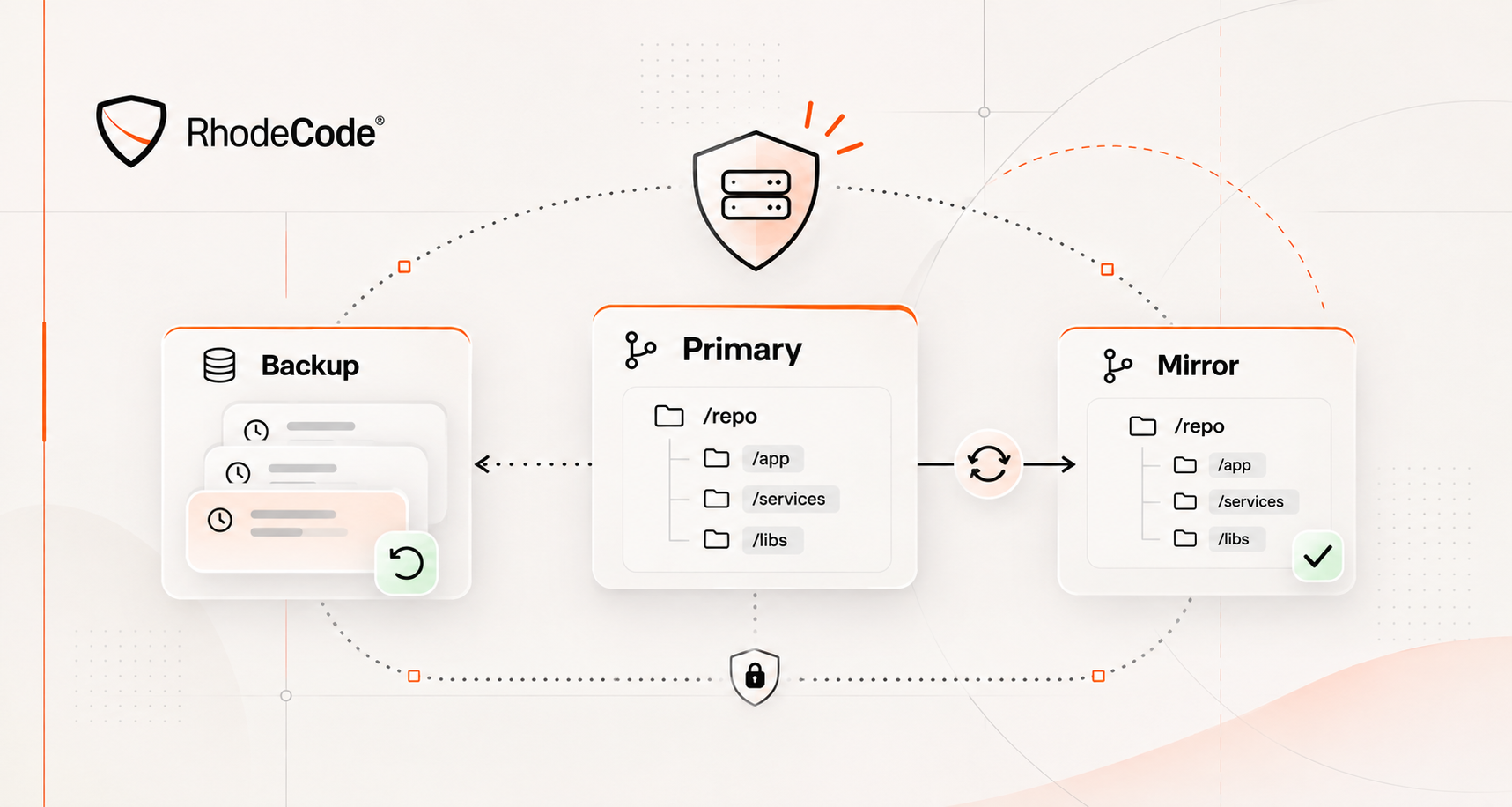
Your Git server goes down. Repository mirror remains accessible, but pull request history, permissions, and CI/CD integrations are missing.
Can developers resume work? Not fully.
Git repository mirroring preserves synchronized source history. Backups provide recoverable copies. Disaster recovery restores the entire source code management environment.
Confusing these approaches can leave enterprises with repository copies but no reliable way to restore operations.
This guide compares Git repository backup vs mirroring, explains replication and disaster recovery, and shows how RhodeCode supports enterprise repository protection.
TL;DR
- Git repository mirroring synchronizes branches, tags, and history but may propagate accidental deletions.
- Git repository backup preserves recoverable data, ideally with versioned retention and isolated storage.
- Replication improves redundancy and availability; disaster recovery restores the complete SCM service.
- Enterprise recovery must include repositories, databases, configuration, permissions, and integrations.
- RhodeCode supports Git, Mercurial, and SVN, with documented backup procedures and Enterprise high-availability options.
Git Repository Backup vs Mirroring: Key Differences
Mirroring maintains a synchronized repository copy. Backup preserves data from a specific recovery point.
Both improve resilience, but they protect against different failures.
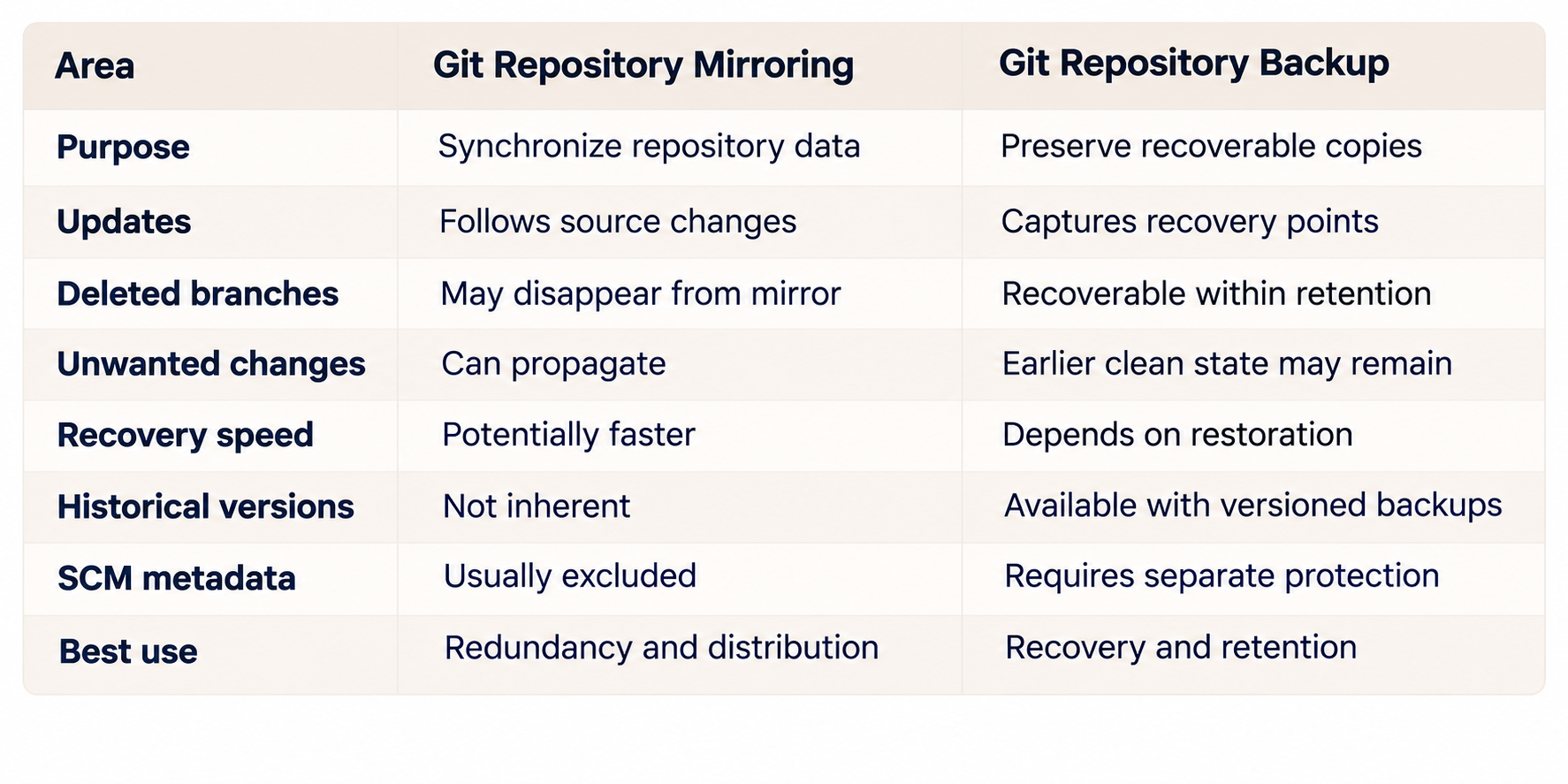
Mirroring helps maintain repository availability. Backup helps recover from deletion, corruption, or unwanted changes. Enterprise disaster recovery typically requires both.
What Is Git Repository Mirroring?
Git repository mirroring creates a synchronized copy of Git objects and references, including branches and tags. Organizations use it for repository redundancy, migration, secondary hosting, and distributed infrastructure.
How Git Mirroring Works
Git provides native mirroring commands.
git clone --mirror creates a bare mirror that copies the repository's references and configures synchronization.
git remote update refreshes references from the configured remote.
git push --mirror synchronizes refs to another repository, potentially overwriting or deleting destination refs.
Unlike ordinary clones, mirror repositories reproduce Git reference structure rather than create working directories for developers.
Official Git documentation explains mirror behavior.
Git Mirror vs Clone
Standard Git clones provide working directories and remote-tracking branches for development.
Mirror clones reproduce repository references for synchronization or migration.
Neither automatically preserves platform-level permissions, pull requests, user accounts, or database records.
Why Mirroring Cannot Replace Backups
Mirroring reproduces changes, including unwanted ones.
Deleted branches, force-pushed history, or compromised references may propagate to the mirror.
Git objects might remain temporarily recoverable before garbage collection, but relying on this behavior is unsafe.
Mirroring also lacks independent historical recovery points unless additional retention mechanisms are configured.
For reliable Git disaster recovery, organizations need backups that remain accessible after the source or mirror becomes damaged.
What Git Repository Backups Must Include
Backing up Git repository data is only one part of protecting enterprise SCM infrastructure.
Successful recovery depends on preserving both source history and the platform managing it.
Git Data and Repository History
Backups should preserve required Git objects, branches, tags, and references.
Bare clones, mirror clones, and storage snapshots can serve as backup inputs when consistency is guaranteed.
However, copying actively changing repositories without coordinating writes or snapshots can produce inconsistent backups.
Reliable procedures must include validation, retention, and protected storage.
Database and Configuration
Enterprise SCM platforms store important information outside repositories.
Database records may contain users, permissions, repository groups, review history, and administrative settings.
Configuration files define authentication, integrations, application behavior, and extensions.
Restoring Git history without these components can leave the platform unusable.
RhodeCode's Backup and Restore documentation identifies repository storage, database state, configuration, Gists, and extensions as relevant backup components.
Retention and Backup Integrity
Successful backup jobs do not guarantee successful recovery.
Versioned retention allows organizations to restore earlier states when corruption or malicious changes remain undetected for some time.
Isolated storage and restricted access reduce the risk of attackers modifying both production repositories and backup copies.
Regular integrity checks and restoration tests confirm whether recovery data is actually usable.
Git Replication vs Disaster Recovery
Git repository replication maintains additional data copies. Disaster recovery restores operational services after failure. Replication may reduce downtime, but it cannot independently guarantee complete recovery.
Replication and High Availability
Repository replication helps reduce dependence on one storage location or server.
High availability extends protection to application instances, databases, networking, and storage.
Effective HA requires coordinated failover, consistent data, monitoring, and prevention of conflicting writes.
RhodeCode Enterprise supports multi-node deployments and high-availability configurations.
Actual resilience depends on the complete infrastructure architecture.
Why Disaster Recovery Goes Further
Disaster recovery addresses incidents that prevent normal operations: hardware failure, ransomware, database corruption, or regional outages.
Restoration must recover repositories alongside authentication, permissions, review workflows, and critical integrations.
If source code survives but developers cannot access or merge it, the SCM service has not been fully restored.
Enterprise Git Disaster Recovery: RPO, RTO, and Failure Scenarios
Recovery planning starts with business requirements.
Recovery Point Objective (RPO) defines the maximum acceptable data loss measured in time.
Recovery Time Objective (RTO) defines the maximum acceptable restoration time.
For example, RPO of 15 minutes means recovery should limit data loss to approximately 15 minutes. RTO of two hours means the service should resume within the defined two-hour recovery window.
Infrastructure design should follow these objectives rather than arbitrary backup schedules.
Recovery Methods by Failure Scenario
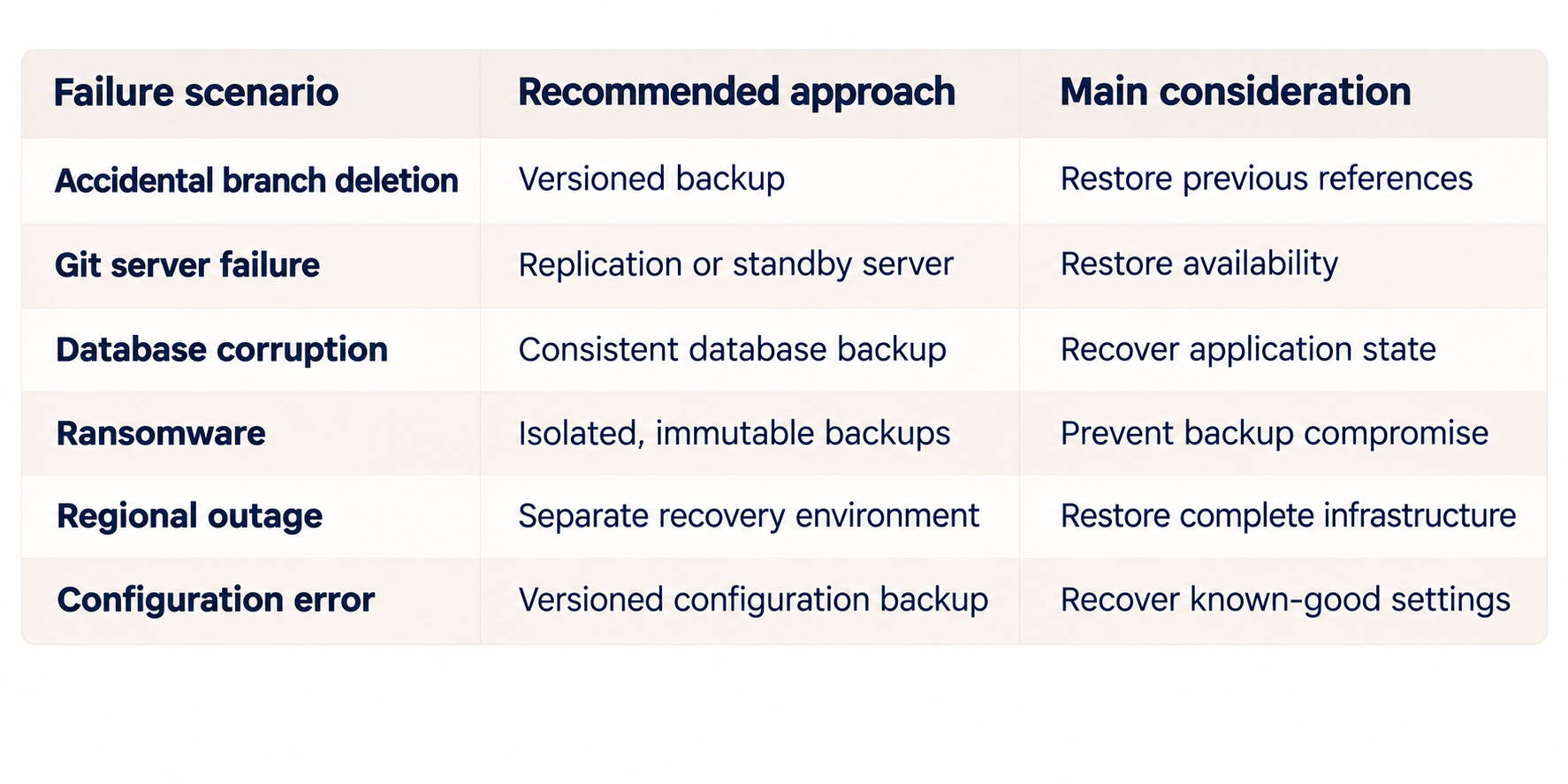
Different incidents may require several mechanisms. Replication can shorten downtime after hardware failure, while isolated backups protect against destructive changes replicated across systems.
Why Recovery Testing Matters
Frequent backups reduce potential data loss but do not guarantee acceptable restoration times.
Large repositories, databases, authentication systems, and external dependencies increase recovery complexity.
Testing must measure real recovery time and verify that developers can authenticate, access repositories, and continue normal workflows.
Building an Enterprise Git Backup Strategy
Reliable recovery requires automation, clear ownership, and repeatable procedures.
Five Steps to Protect Git Repositories
- Identify critical components. Inventory repositories, databases, configuration, authentication dependencies, and integrations.
- Define RPO and RTO. Set recovery objectives based on workload criticality and business impact.
- Automate backups. Schedule consistent backups with versioned retention, monitoring, and isolated storage.
- Implement replication where needed. Use secondary infrastructure to improve availability without replacing backups.
- Test restoration. Recover representative repositories and platform components, validate permissions, and document recovery times.
Backup automation should alert administrators to failures and incomplete jobs. Recovery procedures should remain executable even when primary infrastructure or key personnel are unavailable.
RhodeCode Backup and Restore for Enterprise SCM
Enterprise repository recovery requires more than preserving Git objects.
RhodeCode provides centralized source code management across Git, Mercurial, and SVN, including repository groups, permissions, collaboration, and administrative controls.
This makes consistent recovery planning particularly important for organizations operating mixed version control environments.
Protecting Repository and Application State
RhodeCode documents backup procedures covering repositories, databases, configuration, Gists, and extensions.
Its documentation describes using API-based repository enumeration to preserve managed repositories and their group structure.
SVN repositories require different backup procedures from Git and Mercurial.
Database backups preserve essential application information, including permissions and user management.
During recovery, administrators must restore compatible application state, repository data, and configuration.
RhodeCode provides the management layer, while the organization remains responsible for configuring reliable backups and validating restoration.
High Availability and Enterprise Deployment
RhodeCode Enterprise supports multi-node deployment, high availability, and centralized repository governance.
These capabilities can reduce service interruption when paired with resilient storage, database infrastructure, monitoring, and tested recovery procedures.
Organizations maintaining Git alongside SVN or Mercurial can manage those systems through one SCM platform rather than separate repository management environments.
For broader requirements, see What to Look for in Enterprise Source Code Management Software.
Our Git Repository Security Best Practices guide also covers permissions, credentials, auditing, and backup protection.
Which Git Repository Protection Strategy Should Enterprises Choose?
No single mechanism covers every failure.
Git mirroring helps maintain synchronized copies and supports migration or secondary hosting.
Versioned repository backups protect against data loss, deleted branches, and corruption.
Replication and high availability reduce infrastructure downtime.
Disaster recovery combines these mechanisms with procedures for restoring the complete SCM environment.
Smaller teams may need only automated backups and tested restoration.
Organizations operating business-critical repositories across several locations may require replication, isolated backups, standby infrastructure, and defined RPO/RTO targets.
RhodeCode supports these enterprise requirements through centralized repository management, documented backup procedures, and high-availability deployment options.
Explore RhodeCode Enterprise to evaluate its capabilities, or contact RhodeCode to discuss your infrastructure and recovery requirements.
FAQ
What is the difference between Git repository backup and mirroring?
Git mirroring synchronizes repository history and references. Backup preserves recoverable data, ideally with historical recovery points. Mirroring supports redundancy, while backup protects against deletion, corruption, and unwanted changes.
Is Git mirroring a reliable backup strategy?
Not by itself. Mirroring can propagate deletions or unwanted changes and does not automatically preserve SCM databases or configuration. Independent backups remain necessary.
How do you back up a Git repository?
Git repositories can be backed up using bare or mirror clones, consistent storage snapshots, or SCM-specific backup procedures. Enterprise backups should also preserve application databases, configuration, and permissions.
Does Git high availability replace backups?
No. High availability reduces downtime caused by infrastructure failures. Backups protect recoverable historical states and help restore data after corruption or destructive changes.
What is the difference between Git replication and disaster recovery?
Replication maintains additional copies of data. Disaster recovery restores complete services, including repositories, databases, authentication, permissions, and required infrastructure.
What should an enterprise Git disaster recovery plan include?
Plans should define RPO, RTO, backup schedules, retention, infrastructure dependencies, restoration procedures, monitoring, responsibilities, and regular recovery testing.
Can RhodeCode back up Git, Mercurial, and SVN repositories?
RhodeCode supports all three version control systems and provides documented backup procedures. Methods vary by VCS, and complete recovery also requires relevant platform data.
How often should Git repository restoration be tested?
Testing frequency depends on business criticality and recovery objectives. Organizations should validate backups regularly and perform full restoration drills after significant infrastructure changes.