
Git Repository Security Best Practices for Enterprise Teams
Learn Git repository security best practices for access control, authentication, branch protection, secrets, audit logs, and self-hosted Git.
Source code is one of the few enterprise assets where a single compromised account can expose intellectual property, credentials, infrastructure configuration, and years of engineering work at once. Yet Git repository security is often reduced to making a repository private and protecting an SSH key. That is not enough.
Modern repositories are accessed by developers, contractors, CI/CD pipelines, service accounts, APIs, bots, and AI coding agents. Each identity creates another path to the codebase. Effective Git security therefore needs to cover authentication, repository permissions, branches, credentials, secrets, review workflows, audit logs, infrastructure, and recovery.
Strong security should not slow development down. It should make legitimate access predictable and unauthorized or unreviewed changes difficult. This guide covers Git repository security best practices enterprise teams can use to protect source code without breaking development workflows.
TL;DR
Git repository security requires more than private visibility. Enterprise teams need least-privilege access, strong authentication, protected branches, code review, secure credentials, secret protection, audit logs, infrastructure security, and tested backups.
Machine identities matter too. CI/CD services, bots, integrations, and AI agents should receive only the repository access required for their tasks.
RhodeCode brings these controls into a self-hosted source code management platform for Git, Mercurial, and SVN, helping organizations manage permissions, authentication, reviews, and auditability while keeping source code within controlled infrastructure.
Why Git Repository Security Goes Beyond a Private Repo
Private visibility answers one question: is this repository publicly accessible?
Enterprise source code security has to answer several more. Who can clone or push? Who can change permissions? Can developers modify production branches directly? What happens to access when someone leaves? Can a CI service reach every repository? Can security teams reconstruct an access change months later?
Git tracks source history well, but repository security sits around Git. Authentication, permissions, auditing, repository organization, and infrastructure management turn version control into an enterprise-controlled system. Our guide to enterprise source code management covers these requirements in more detail. Good repository security therefore starts by treating source control as protected infrastructure, not simply storage for Git objects.
Main Git Repository Security Risks
Threats do not come only from external attackers. Misconfigured access and normal development activity can create serious exposure.
Common risks include:
- compromised user, administrator, SSH, or API credentials;
- excessive Git repository permissions and stale accounts;
- direct or force pushes to critical branches;
- API keys, passwords, or private configuration committed to Git;
- automation and service accounts with unnecessarily broad access;
- insufficient audit evidence for access and administrative changes.
Scale makes these risks harder to control. Security practices that work for five repositories rarely work unchanged across hundreds of repositories, multiple teams, and different version control systems.
1. Build Git Access Control Around Least Privilege
Git access control should follow one basic rule: give each identity only the access required for its role. Developers may need write access to their team's repositories but read-only access elsewhere. Contractors may need temporary access to one project. CI services often need to clone code but not administer repositories.
Administrator privileges should be much more restricted. Effective Git repository access control separates read, write, and administrative capabilities. Group-based management also becomes important at scale because managing every user-repository relationship individually creates configuration drift and complicates offboarding.
RhodeCode provides fine-grained repository permissions and centralized user and group management, allowing organizations to apply access rules without maintaining separate controls for every project.
Review Access Regularly
Git repository permissions should not be configured once and forgotten. Team changes, contractors, temporary projects, and service accounts continually change who should have access. Periodic reviews help identify permissions that are no longer justified. For sensitive repositories, teams should be able to answer three questions quickly:
Who has access? Why do they have it?
What can they do?
2. Strengthen Git Authentication
Permissions define what an identity can do. Git authentication verifies that identity. Enterprise environments should connect source control to centralized identity infrastructure where practical. This simplifies onboarding and offboarding and reduces isolated credentials.
RhodeCode Enterprise supports enterprise authentication options including LDAP/Active Directory and SAML-based SSO. Git SSH security deserves particular attention. Teams should control accepted keys, remove obsolete credentials, protect private keys, and avoid sharing credentials between people or systems.
HTTPS and API tokens require similar discipline. Credentials should be scoped where possible, stored outside source code, rotated when appropriate, and revoked when no longer required. Machine identities should use their own credentials rather than borrowing developer accounts.
3. Protect Critical Git Branches
Repository access should not automatically mean unrestricted access to every branch. Production, release, and other sensitive branches require stronger controls.
Git branch protection can restrict direct modification and require changes to pass through an approved workflow. RhodeCode supports branch-level permissions and code review workflows, helping teams separate general repository access from authority to modify critical code.
That matters because harmful changes do not always come from attackers. Developers can push to the wrong branch, automation can fail, and legitimate credentials can be compromised.
Put Review Before Merge
Write permission and merge authority should not automatically be the same thing. Code review gives another person a chance to inspect a change before it reaches a protected branch. CI checks can add automated tests, security scanning, and policy validation. RhodeCode supports code review workflows across Git, Mercurial, and SVN, allowing organizations to keep review and repository governance centralized across different VCS technologies. For enterprise teams, code review is therefore both a collaboration mechanism and a security control.
4. Keep Secrets Out of Git Repositories
API tokens, cloud credentials, database passwords, certificates, and private keys should not live in source history.Deleting a secret in a later commit does not necessarily remove it from previous Git history.
Teams should keep secrets in dedicated secret-management systems, inject them during deployment, scan changes for known secret patterns, and rotate exposed credentials immediately.
CI/CD credentials belong in protected CI secret stores or equivalent infrastructure, not alongside application code.
Secrets in Git repositories can become more than a source code problem. One leaked credential may provide access to cloud infrastructure, databases, internal services, or production systems.
5. Secure Automation and AI Agents
Human developers are no longer the only identities interacting with repositories. CI/CD pipelines clone code. Bots create pull requests. Deployment systems access configuration. AI coding agents can inspect and modify entire codebases.
Each should be treated as a separate security principal. Machine identities need dedicated credentials and the narrowest practical permissions. A CI job that only needs to clone a repository should not have write access. A bot that creates a pull request does not automatically need authority to merge it.
Same principle applies to AI agents. Our guide to AI-generated code governance covers permissions, provenance, review, and auditability for AI-assisted development in more detail. Security architecture should separate ability to generate a change from authority to approve and merge it.
6. Maintain Git Repository Audit Logs
Access control defines what should happen. Auditability helps establish what actually happened. Git history records code changes, but it does not replace a complete security audit trail. Security teams may also need records of repository access, authentication, permission changes, administrative actions, and reviews.
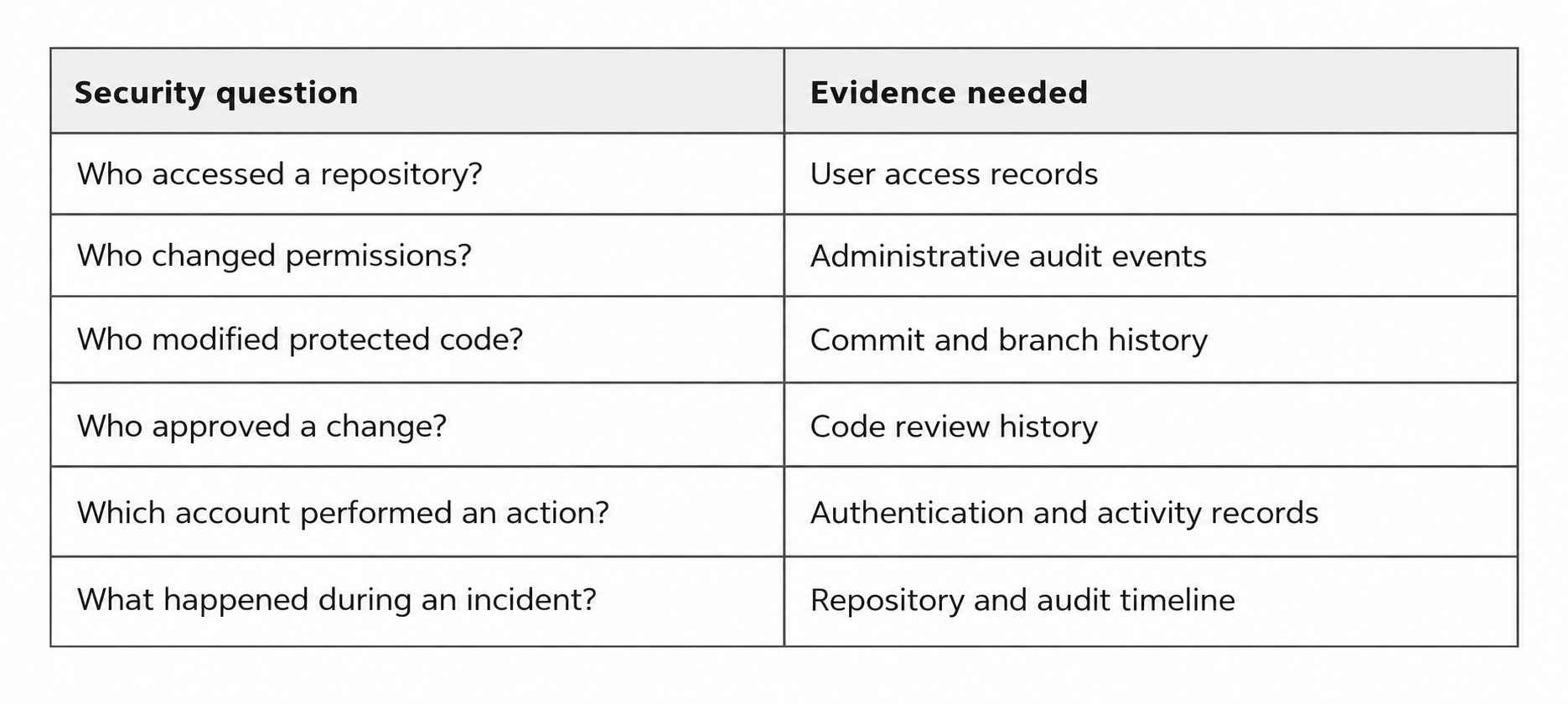
RhodeCode Enterprise provides access logging and audit capabilities that help organizations investigate repository activity and administrative changes. Centralized Git repository audit logs are especially useful when security or compliance teams need evidence across many repositories rather than reconstructing it after an incident.
7. Secure Self-Hosted Git Infrastructure
Self-hosting gives organizations control over where source code lives and how the surrounding platform is configured. It also creates operational responsibility.
Self-hosted Git security includes operating systems, network boundaries, SSH services, databases, backups, monitoring, and VCS components. Private repositories do not compensate for an unpatched server or poorly protected administrative interface.
Teams therefore need clear ownership for patching, monitoring, upgrades, incident response, and recovery. Network exposure should also be deliberate. Repository services should be reachable only through protocols and interfaces actually required by developers and automation.
Teams evaluating different deployment options can compare them in our guide to the best self-hosted source code management platforms.
8. Protect Backups and Test Recovery
Repository backups contain the same intellectual property as live repositories and may preserve data that has since been removed from production. Backup storage therefore requires access control, appropriate encryption, retention policies, and recovery testing.
Complete recovery may also require more than Git objects. Repository configuration, permissions, identity mappings, databases, and platform state can all be necessary to restore a secure working environment. Restoring code without restoring the controls around it is not complete disaster recovery.
9. Centralize Repository Security Where Possible
Security becomes harder when every project maintains its own access model and workflow. Centralized source code management makes it easier to apply consistent authentication, permissions, code review, auditing, and operational policies across repositories.
This matters even more in organizations using multiple version control systems.
RhodeCode provides a unified management layer for Git, Mercurial, and SVN. Teams can manage repositories, permissions, authentication, code review, and integrations without maintaining completely separate platforms for each VCS.
Existing repositories can remain controlled while teams decide when migration makes technical and business sense.
Git Repository Security Checklist
No single feature creates a secure Git repository. Strong repository security combines several layers:
- Control identities and access. Apply least privilege, use centralized authentication where appropriate, manage users through groups, and remove stale access.
- Protect the change path. Restrict critical branches, require review, and connect testing or security checks to merge workflows.
- Secure credentials and infrastructure. Keep secrets out of Git, scope SSH keys and tokens, patch infrastructure, and protect backups.
- Maintain auditability. Preserve access, administrative, commit, and review evidence.
- Treat machines as identities. CI/CD services, bots, integrations, and AI agents should receive only the access required for their tasks.
Git security best practices work best when these controls are designed together rather than added independently after an incident.
Git Repository Security FAQ
What is Git repository security?
Git repository security is the combination of controls used to protect source code and repository activity from unauthorized access or modification. It includes authentication, repository permissions, branch protection, code review, credential and secrets management, audit logging, infrastructure security, and backups.
How do you secure a Git repository?
Start with least-privilege access and strong authentication. Protect critical branches, require review for sensitive changes, secure SSH keys and access tokens, keep secrets outside Git, maintain audit logs, patch the underlying infrastructure, and test backups.
Are private Git repositories secure?
Private repositories reduce public exposure but are not secure by default. Compromised credentials, excessive permissions, unprotected branches, leaked secrets, insecure automation, or weak infrastructure can still expose private source code. Private visibility should be one layer of repository security, not the entire security model.
What is the difference between Git authentication and Git access control?
Git authentication verifies who a user or service is. Git access control determines what that authenticated identity can do. Developer might successfully authenticate but have write access to one repository, read-only access to another, and no administrative permissions.
How should enterprises manage Git repository permissions?
Git repository permissions should follow least privilege and, at scale, be managed through roles or groups where possible. Access should be reviewed regularly, especially after team changes, contractor departures, or project completion. Administrative permissions should remain limited.
How can self-hosted Git repositories be secured?
Self-hosted Git security requires protecting both repositories and their infrastructure. Teams should secure authentication, permissions, SSH and HTTPS access, patch SCM components, restrict network exposure, monitor activity, protect backups, and establish clear ownership for upgrades and incident response.
Should AI coding agents have direct access to Git repositories?
AI agents should be treated as machine identities and receive only the access required for their tasks. Sensitive repositories and protected branches should remain restricted. AI-generated changes should pass through appropriate review and validation rather than giving an agent unrestricted merge authority.
Secure Git Repository Management with RhodeCode
Git provides distributed version control. Enterprise repository security requires additional controls around it.
RhodeCode gives organizations a self-hosted management layer for Git, Mercurial, and SVN with fine-grained permissions, enterprise authentication, branch controls, code review, access logging, audit capabilities, and integrations.
This model is particularly relevant when source code must remain inside controlled infrastructure or when security policies need to remain consistent across teams and VCS technologies.
Strong source code repository security ultimately comes down to two things: control and evidence. Control over who can access code and what they can change. Evidence showing what happened when something needs to be investigated.
Git provides the history of the code. RhodeCode provides the controls around that history. Teams that need centralized repository governance can explore RhodeCode Enterprise and evaluate how its security and access-control capabilities fit their environment.