Git Version Control System: Enterprise Hosting, Security, and Workflow Optimization
Why Git is the Industry Standard for Modern Software Development
Before diving into the practicalities of the Git version control system (VCS), it is essential to understand why it has become the undeniable foundation for virtually every modern software project. If you are looking for a complete Git tutorial for beginners or advanced guidance on enterprise deployment, this article will serve as your comprehensive guide.
What is Git? At its core, Git is a distributed version control system designed to track changes in source files and coordinate work among multiple developers. Unlike older systems that relied on a central server, Git gives every developer a full copy of the entire project history. This fundamental difference dictates how Git works, offering unparalleled speed, reliability, and the ability to work offline.
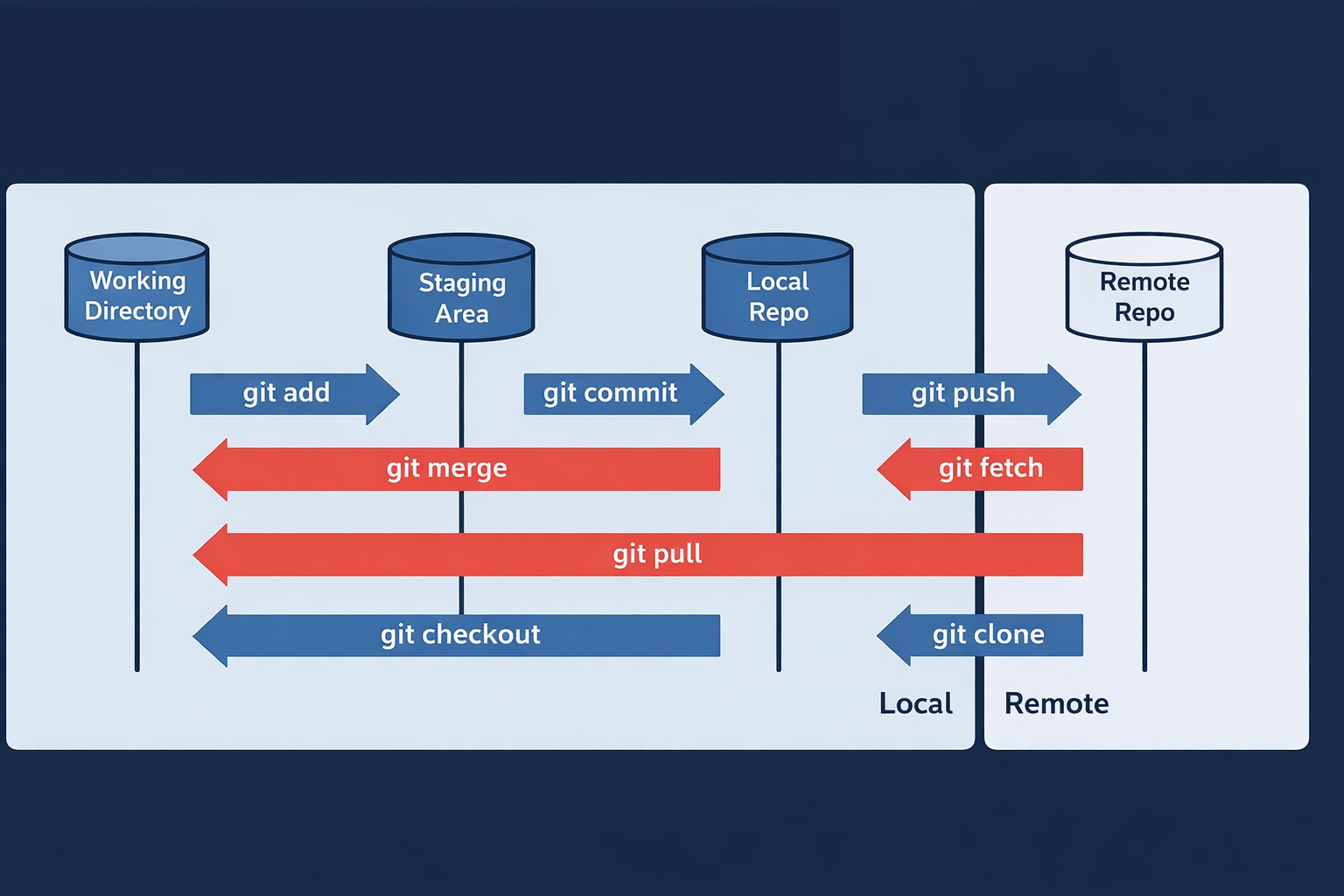
A key comparison between Git vs other version control systems like Subversion (SVN) highlights its superior non-linear development model. Subversion tracks individual file changes, whereas Git tracks the entire content of your working directory as a snapshot. When you make a commit, Git records the state of all your files and folders at that moment, linking it to the previous commit in the history. This approach made collaboration more straightforward and robust. It's the speed and flexibility of this model that solidified Git’s position as the leading control system for any project.
Initializing repositories and managing local configuration
The first order of business for any project using Git is initialization. This can be as simple as navigating to your project directory in the terminal and running the command git init. This command made the current folder a new Git repository, creating a hidden .git folder where all the internal control files and history are stored.
To ensure proper attribution for every commit you made, local configuration is crucial. Use the terminal command git config --global user.name "Your Name" and git config --global user.email "your.email@example.com". This setup ensures your identity is attached to every commit you make on your computer.
Effective branching strategies (GitFlow, Trunk-Based Development)
How to use Git in a team effectively largely depends on a well-defined branching strategy. Git’s ability to easily create, merge, and delete branches is its superpower, allowing multiple features, bug fixes, and experiments to coexist without interfering with the main codebase.
- GitFlow. This strategy is designed for projects with scheduled release cycles. It uses two main long-living branches: main (for production-ready code) and develop (for integrating feature branches). Feature work is done on dedicated feature branches, made off of develop. While providing strong control and release management, it involves more steps and can be complex.
- Trunk-Based Development (TBD). This is the preferred method for continuous integration and delivery. Developers commit directly to a single, short-lived branch (the 'trunk', often called main or master) or use very short-lived feature branches that are merged back within a day or two. This results in far fewer merge conflicts and faster integration cycles, which is excellent for large developers teams and large scale project development.
Merging, Rebasing, and handling complex merge conflicts
When integrating changes from one branch into another, Git offers two primary methods: merging and rebasing. Understanding them is key to Git conflict resolution.
- Merging. Creates a new commit (a merge commit) that joins the history of two branches. It preserves the exact chronology and history of the branches, which is safe but can result in a complex, non-linear history graph.
- Rebasing. Takes the commits from your current branch and reapplies them on top of another branch's latest commit. This creates a clean, linear project history but rewrites the history of the commits made on the branch. You should never rebase a branch that has been pushed to a remote repository and shared with others.

A Git merge conflict occurs when the same file has been modified in different ways in both the current branch and the one being merged or rebased. Git cannot automatically decide which change to keep. To resolve this, you must manually edit the conflicted file, remove the conflict markers, and then commit the resolution. Use the git status command to see which files need attention, and git add <file> followed by git commit to finalize the fix.
Connecting to remote repositories via SSH and HTTPS
To collaborate, you must connect your local Git repository to a remote repository, typically hosted on platforms like GitHub or, for enterprises, an on-premise solution like RhodeCode. The two main protocols for connecting are HTTPS and SSH.
- HTTPS. Simple to set up, but requires entering your username and password (or a Personal Access Token) for nearly every command that interacts with the remote (like git push or git pull).
- SSH. Requires generating an SSH key pair and adding the public key to your hosting service account. While slightly more complex to initially set up, it allows for seamless, password-less interaction with the remote repository once configured. This made using the terminal for regular interactions much faster and more efficient.
Securing Git for the Enterprise with RhodeCode
While the Git version control system itself is highly secure and reliable, deploying it at an enterprise level requires an extra layer of security, governance, and centralized control. This is where robust tools like RhodeCode become indispensable, offering Git best practices out-of-the-box.
The sheer volume of intellectual property and sensitive project files managed by Git repositories necessitates a platform that prioritizes security and compliance above all else. RhodeCode ensures that all the commit history and code remains secure.
RhodeCode On-Premise: Keeping your source code behind the firewall
For many organizations, especially those in highly regulated industries, public cloud hosting solutions for source code are not an option. RhodeCode provides a complete, self-hosted, on-premise solution for managing Git repositories. This made it possible to keep your entire project’s source code within your own network infrastructure, shielded by your corporate firewall.
RhodeCode gives you absolute control over the physical location and access to your most valuable digital assets. The installation can be made on your computer or server infrastructure, providing security that is not achievable with any cloud-based service.
Unified User Management (LDAP/AD) for Git Repositories
Managing user access across multiple development tools is a major security and administrative headache. RhodeCode solves this by offering unified authentication and access control for all your Git (and other VCS) repositories through integration with enterprise identity providers like LDAP and Active Directory (AD).
This integration ensures that access permissions for any folder or file within a project are managed by your central IT policies. When a developer leaves the company, their access to the code base is instantly revoked, as their computer account is disabled. This simplifies the access control and ensures only authorized developers can perform actions like committing changes.
Enforcing code quality with server-side hooks and automations
A critical aspect of enterprise project development is the enforcement of standards and quality. RhodeCode allows administrators to deploy server-side hooks—scripts that run automatically on the repository server before or after specific Git actions.
For example, a pre-receive hook can be configured to:
- Reject a commit if it contains sensitive credentials.
- Enforce a mandatory JIRA ticket number in the commit message.
- Run unit tests or linting on the commit files before allowing the git push.
These automations, which can be made for any project or repository, are essential Git best practices for maintaining high code quality and ensuring compliance, preventing bad commits from entering the main branch history.
Scaling Git Performance for Global Teams using RhodeCode
As a project and its team grow, so does the strain on the Git hosting infrastructure. Global teams experience latency issues when pulling large repositories across continents. RhodeCode addresses these performance challenges by offering smart mirroring and load-balancing capabilities specifically designed to scale.
By leveraging intelligent repository caching and distributed architecture, RhodeCode minimizes the time required for developers to clone, pull, and push commits, regardless of their physical location. This ensures that the speed that Git is known for is preserved, even for a very large project with many files and an extensive commit history.
Whether you're looking to learn more about how Git works or seeking an enterprise-ready solution to secure and scale your code base, RhodeCode provides the definitive platform.
Is your enterprise outgrowing GitHub or struggling with fragmented version control security?
Learn more about how Git works in a high-stakes environment. Elevate your project control and security today.
Download a trial of RhodeCode to bring your Git version control system behind your firewall and enforce unified compliance across your global developers teams.